
1. How to change the description of your file at 4shared?
How to change the description of your file at 4shared?
There are 2 ways to change the description of your file at 4shared:
-
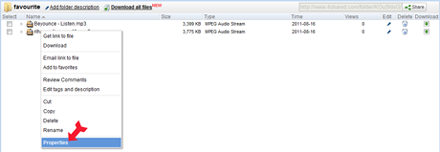
- Select the file in your 4shared account;
- Right-click on the file and select “Properties”;
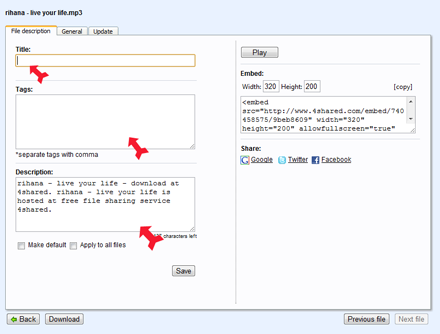
- Enter the Title, Description and the Tags to your file and select “Save”.
Testimonials:

Baron, 33
“ I’ve changed the description to my photos at 4shared, and have got a great number of orders from people to make their photo sessions. Thanks to 4shared, I’m now earning much more.”
“ I’ve changed the description to my photos at 4shared, and have got a great number of orders from people to make their photo sessions. Thanks to 4shared, I’m now earning much more.”

Ashley, 20
“ I’ve decided to change the descriptions to some of my short stories, stored at 4shared, and because of that I have recently signed the contract with a publishing agency.”
“ I’ve decided to change the descriptions to some of my short stories, stored at 4shared, and because of that I have recently signed the contract with a publishing agency.”